Shopfront Lens · Native app
Sharing finds.Saw this.Thought of you.
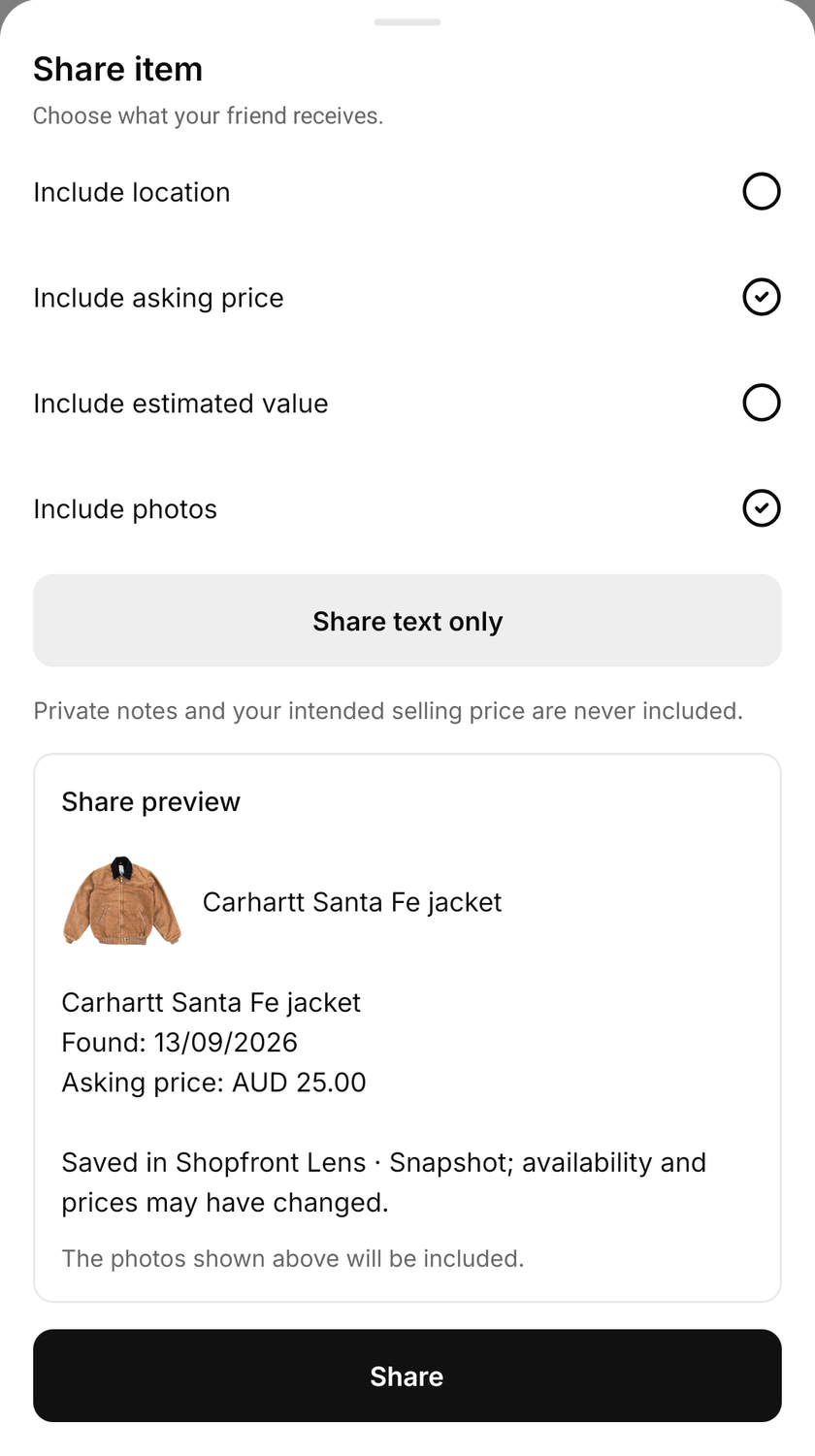
Some finds have a friend’s name written all over them. Send an item or a saved place through your phone’s share menu, with the photos and details you choose. Preview the message first, then pass it on. Your friend receives a snapshot of the find, with no access to your saved library.
See how it works

Available for iOS and Android.

Make it part of your day
A little “this made me think of you”.
Choose what goes with it
Open sharing for an item or saved place. Include an available item photo, or choose text only. Prices are optional. When sharing a place, select the items you want to send with it.
Read the preview
Check the item details, optional price and location before sending. The price on the tag and the estimated asking value are separate choices. Private notes and your intended selling price are never included.
Send it their way
Open your phone’s share menu and choose an available messaging app or another destination. What happens next depends on that app and the files it supports. The shared details are a copy of what you selected at that moment.
Before you send
You choose what goes with the find.
- Photos or text
- Include the available item photo, or send a text-only message. Review the photo preview before you share.
- The price on the tag
- Off by default. Choose to include the saved asking price and currency, separately from the estimated value.
- An item’s location
- Off by default when sharing an item. Sharing a saved place includes that place’s location, shown in the preview.
- Your private notes
- Never included. Your intended selling price also stays out of the shared message.
A useful message, with the right context.
Send the jacket photo while you are still at the shop, or pass on a saved place after a weekend market. Add the advertised price when it helps your friend decide whether to take another look.
The saved asking price is what was on the tag. The estimate is context from comparable asking prices. Neither confirms what the item will sell for, and the price or availability may have changed since you saved it.
A snapshot you can send.
Sharing does not create a shared collection or a live feed. Your friend receives the chosen details through the destination app; later edits to your saved item will not update that message.
Your saved library stays on your device. Sharing does not back it up or sync it to another phone, and signing out clears local saved data. Check the preview each time, especially when a saved place’s location is part of the message.
Make it part of your day
For your kind of finding.
“This is your colour.”
Send an item photo to a friend while you are browsing. Include the price on the tag if you saved it.
“Worth a look next weekend.”
Share a saved shop or stall with selected finds. Review the place’s location and the items included in the message.
“What do you think?”
Ask for a second opinion on a find. Add the estimate when useful, keeping it distinct from the advertised price.
A few things to know
Sharing finds.
Good questions.
Does my friend need Lens to receive a find?
No. Your friend can read the message and view the photos in the app you share them through. They do not need Lens or access to your saved library.
Is my location shared automatically?
For an individual item, location is off by default. Sharing a saved place includes that place’s location. The preview shows what will be included before you open the share menu.
Can I share the price without the location?
Yes, when sharing an item. Select the saved asking price or estimated value and leave item location off. The saved asking price includes its currency.
Will later edits update the message?
No. Sharing sends a snapshot of the selected details. If you change the item or price later, send another message to share the update.
Can we edit a collection together?
No. Sharing sends selected details rather than giving someone access to a collaborative collection. Saved items and collections remain on your device.
Start with a little curiosity
Check your next find for free.
200 free price checks per calendar month. Included on the Free plan with a registered account. Paid plans include higher native app allowances. Web and app allowances are separate and reset on the 1st of each month at midnight in Melbourne.
Shopfront Lens is available on the App Store and Google Play. The native app requires a Shopfront account; create one on the web, then sign in. You can also try photo-based price checks in your browser.
Read the Lens getting-started guide