Shopfront Lens · Native app
Clothing measurements.The right details.Right where you need them.
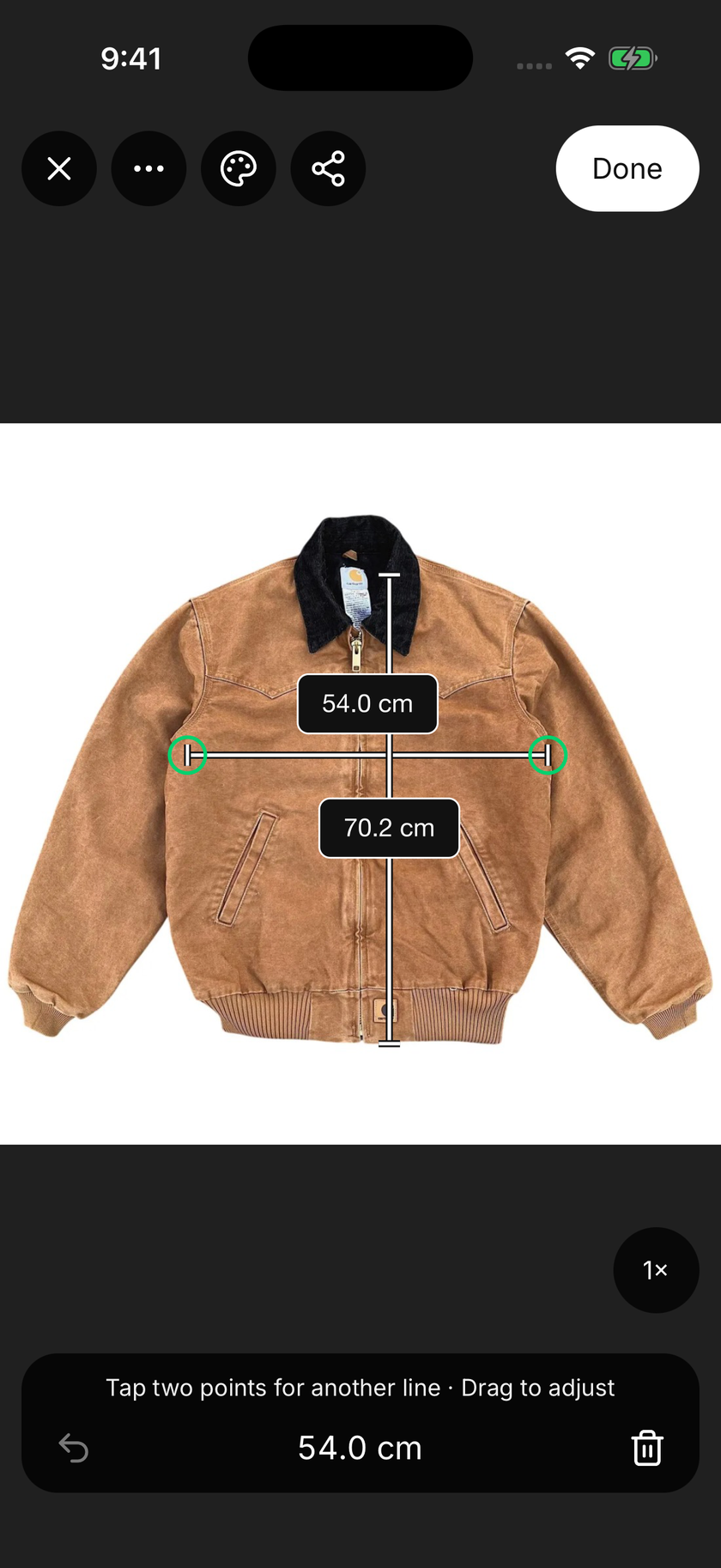
Shopfront Lens uses camera depth data on supported devices to help measure an item and keep the dimensions on its photo. Adjust the points, label the details and choose centimetres or inches, or enter measurements taken with a tape. Style and share the image so buyers can compare dimensions with a garment they already own. Measurements have no monthly quota and don’t use your price-check allowance.
See how it works

Available for iOS and Android.
Make it part of your day
How do you add clothing measurements?
Lay out the item
Place the garment flat and smooth it without stretching the fabric. Keep the area you want to measure visible. Camera support depends on the device and surface; you can also measure with a tape and enter the values by hand.
Mark and label the dimensions
Place or adjust the measurement lines on the photo. Name the dimensions so another person can understand what each one means, such as chest width or body length. Check the endpoints and choose the units you want to show.
Save a useful reference
Review the values, customise the appearance and save the measurement image with the item. Export a JPG or PNG to add to a marketplace listing, send to a buyer or keep as a wardrobe reference.
Make the measurement easy to understand.
A number is more useful when you can see where it was taken. Lines on the photo show the measurement’s endpoints, while labels explain the dimension. For a shirt, chest width measured flat is different from a measurement around the body; make that distinction clear in the label or notes.
Choose a consistent method when comparing two garments. Lay them out in the same way and compare matching dimensions. A favourite piece that already fits can be a helpful reference, but fabric, stretch and cut still affect how another garment feels.
Camera depth puts the photo in context.
On supported devices, Lens uses camera depth data to help calculate distances between selected points. Capture the item clearly, review the measurement points and adjust them before saving. Device capabilities, the surface and capture conditions affect the result.
There is no monthly measurement quota, and measuring does not consume price checks. You can keep measuring after your price-check allowance runs out. AI-assisted measurement requests are subject to rate limits; manual measurement entry remains available.
A guide, with room for a tape check.
Camera-assisted measurements depend on the phone, the surface and how the item is positioned. They are a guide rather than a guarantee of fit. Use a tape for fit-critical dimensions, curved seams and depth, and check the saved values before sharing them.
Manual entry remains useful when the camera cannot measure a surface or you already have trusted dimensions. You can still keep the numbers on the photo, adjust the labels and save a styled image with the rest of the item’s details.
Make it part of your day
For your kind of finding.
Compare an op-shop find with a familiar fit
Keep dimensions for a favourite jacket or pair of jeans. Bring that record along when comparing pieces at a thrift store or op shop.
Know your wardrobe
Keep a visual reference beside each item’s photos and notes. Useful details stay with the piece when you revisit a wardrobe clear-out.
Prepare donations for sale
Record labelled dimensions while an item is already laid out. A saved measurement photo can help the next person preparing its listing.
A few things to know
Clothing measurements.
Good questions.
Can I enter measurements manually?
Yes. You can enter dimensions taken with a tape and keep them on the item’s photo. Camera-assisted measurement is optional and depends on device and surface support.
Does Lens support centimetres and inches?
Yes. Lens lets you switch between centimetres and inches for your measurement artwork. Review the units before saving or using the photo as a reference.
Can Lens guarantee that clothes will fit?
No. Measurements are a guide. Use a tape to check fit-critical dimensions, and consider fabric, stretch and cut as well as the numbers.
Can I change how the measurements look?
Yes. You can customise colours, lines, labels and fonts, then save reusable measurement styles. The appearance changes while the measurement values remain the same.
Start with a little curiosity
Check your next find for free.
200 free price checks per calendar month. Included on the Free plan with a registered account. Paid plans include higher native app allowances. Web and app allowances are separate and reset on the 1st of each month at midnight in Melbourne.
Shopfront Lens is available on the App Store and Google Play. The native app requires a Shopfront account; create one on the web, then sign in. You can also try photo-based price checks in your browser.
Read the Lens getting-started guide