Shopfront Lens · Native app
Saved finds & collections.A place for every find.And every little detail.
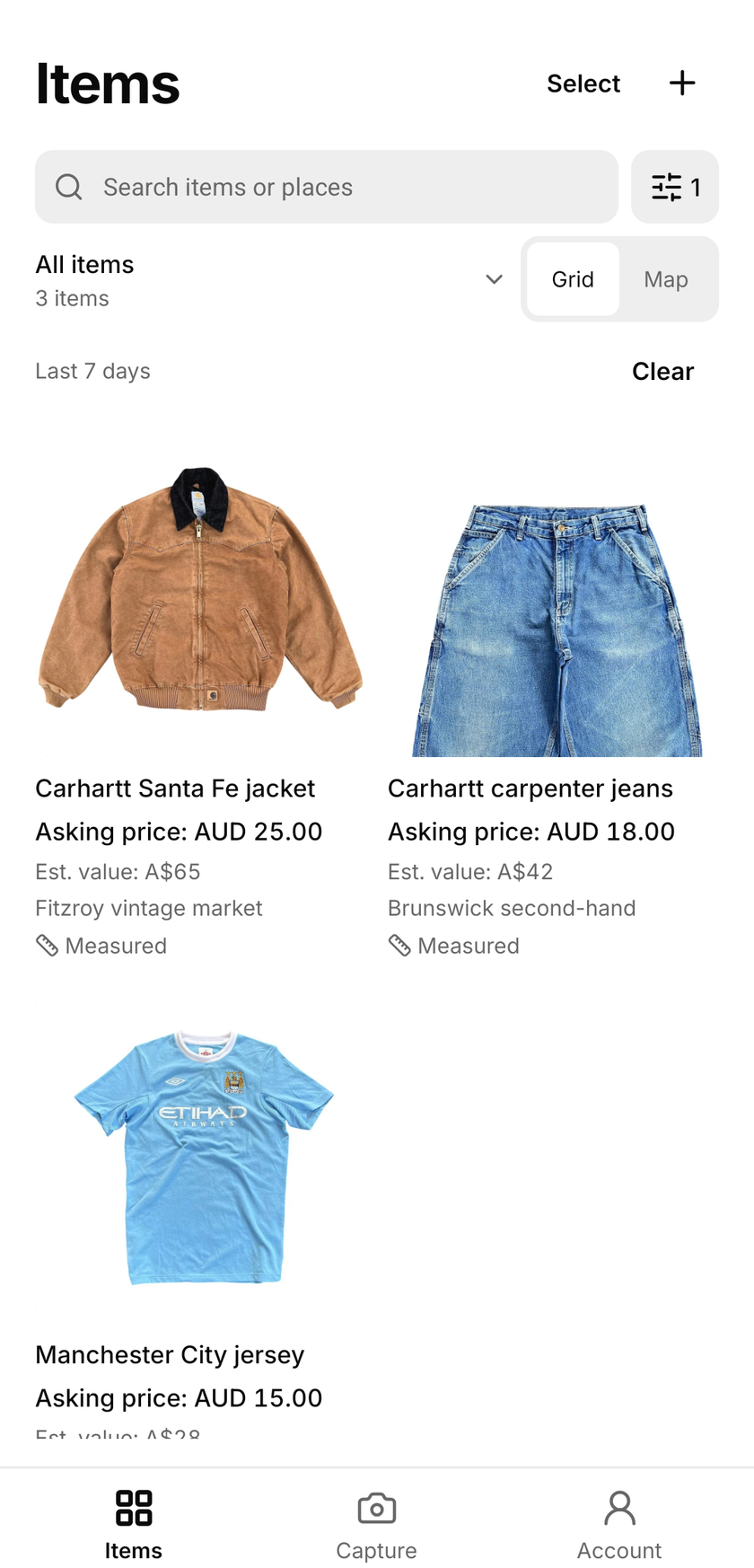
Find the jacket from last weekend without searching your camera roll. Browse saved items by date, search an item or shop name, and filter by source. Keep the advertised price and currency with each piece, then group favourites into collections for a shopping trip, your wardrobe or a donation batch.
See how it works

Available for iOS and Android.
Make it part of your day
How do you organise items in Lens?
Keep the item
Save an item with its photos and useful details. Add notes while the piece is in front of you, such as where you found it or what needs a closer look. You can add price checks and measurement photos when they help.
Give it a place
Create a collection around the way you work: wardrobe staples, weekend finds or a donation batch. Group the relevant items together so the next time you open Lens, you have a smaller set of pieces to work through.
Come back with context
Open a saved item to revisit its photos, notes, measurements and price checks. Keep using it as a personal reference, or send selected items to Shopfront as listing drafts when you are ready to prepare them for sale.
Keep the context
Less searching. More finding.
- Go back by date
- Choose today, the last 7 or 30 days, this month or custom dates. Date filters use your local time.
- Remember the source
- Filter retail stores, online stores and marketplaces, second-hand stores, garage or estate sales, markets or events, auctions and other sources.
- Keep useful details close
- Search item and place names, filter price-checked or measured items, and sort newest or oldest first.
Less to remember. More to come back to.
A photo alone does not always tell the whole story. The jacket might need a button, the jeans might have a useful flat waist measurement, or the tote might be part of a donation drop. Keeping notes and dimensions beside the item helps you pick up where you left off.
Use collections that reflect your own routine. You do not need a shop or a plan to sell every piece. A collection can be a record of things you already own, a group of finds you are considering or a batch you want to sort later.
Ready to sell? Start with a draft.
The native app can send selected items to Shopfront as listing drafts, including their photos and saved measurement images. Draft creation depends on your Shopfront workspace’s plan, billing status and remaining listing allowance. Review the draft’s details in Shopfront before publishing. Saving an item in Lens or putting it in a collection does not publish a marketplace listing.
Items and collections are saved on your device. They are not automatically backed up or synced across phones, and signing out clears local saved data. You can share selected details as a snapshot, or separately send items to Shopfront as listing drafts.
Make it part of your day
For your kind of finding.
Organise a wardrobe
Group favourite pieces and keep their measurements close. Revisit the collection when comparing a potential purchase or deciding what to pass on.
Remember a day’s finds
Keep photos and notes from a thrifting trip together. Return to the items you want to research instead of searching your entire camera roll.
Work through a donation batch
Capture the details while sorting a group of donations. Keep that batch together on the capture device and prepare selected items for listing later.
A few things to know
Saved finds & collections.
Good questions.
Do I have to sell the items I save?
No. Collections work as a personal reference for wardrobe pieces, thrift finds and donations. Sending an item to Shopfront as a draft is optional.
What can I keep with a saved item?
You can keep photos, notes, measurements, price checks, the price on the tag and source details together. Save a place on the map and filter by date or source type. Collections group the saved items so you can return to them.
Are collections shared across devices?
No. Items and collections are saved on your device. They are not automatically backed up or synced across phones, and signing out clears local saved data. You can share selected details as a snapshot, or separately send items to Shopfront as listing drafts.
Does sending an item to Shopfront publish it?
No. Selected items are sent as listing drafts with their photos and saved measurement images. Review the draft in Shopfront before publishing it.
Start with a little curiosity
Check your next find for free.
200 free price checks per calendar month. Included on the Free plan with a registered account. Paid plans include higher native app allowances. Web and app allowances are separate and reset on the 1st of each month at midnight in Melbourne.
Shopfront Lens is available on the App Store and Google Play. The native app requires a Shopfront account; create one on the web, then sign in. You can also try photo-based price checks in your browser.
Read the Lens getting-started guide